

How WhatsApp Works Without Internet
Offline Messaging and Sync Explained

Imagine this:
You’re on a flight. Airplane mode is on. You open WhatsApp, type “Landed safely, talk soon”, and hit send.
The message appears instantly in the chat with a small clock icon beside it—even though your phone has no internet connection.
A few minutes later, once you reconnect to Wi-Fi or mobile data, the message gets delivered automatically.
To most users, this feels simple. But under the hood, it’s a carefully designed system built around offline-first architecture, local storage, syncing, and eventual consistency.
Let’s break down how it works.
Why Messaging Apps Need Offline Support
Messaging apps need offline support for several important reasons:
User Experience
Networks are unreliable — users move through dead zones, tunnels, and weak signal areas constantly. Without offline support, the app becomes completely unusable the moment connectivity drops.
Users expect to compose messages anytime, even if delivery happens later. Forcing them to wait for a connection to even type is frustrating.
Message Reliability
Offline queuing ensures messages aren't lost if the connection drops mid-send. The app retries automatically when reconnected, rather than silently failing.
Users shouldn't have to remember to resend something — the app should handle that transparently.
Access to History
- People frequently need to reference past conversations — addresses, confirmations, photos — in places with no signal (airports, basements, abroad). Without local caching, that history disappears.
Performance
- Loading messages from a local cache is near-instant, while fetching from a server adds latency even on good connections. Offline support often improves the online experience too.
Trust and Retention
- If an app loses messages or becomes a blank screen when connectivity wavers, users lose trust in it quickly. Reliability is foundational to a communication tool.
Global Reach
- In many markets — rural areas, developing regions — connectivity is intermittent by default, not the exception. Apps without offline support are essentially unusable for large portions of the world.
The core principle: a messaging app is a communication tool, and communication can't wait for a perfect network. Offline support shifts the burden of network unreliability from the user to the app, where it belongs.
What happens when you send the message without internet
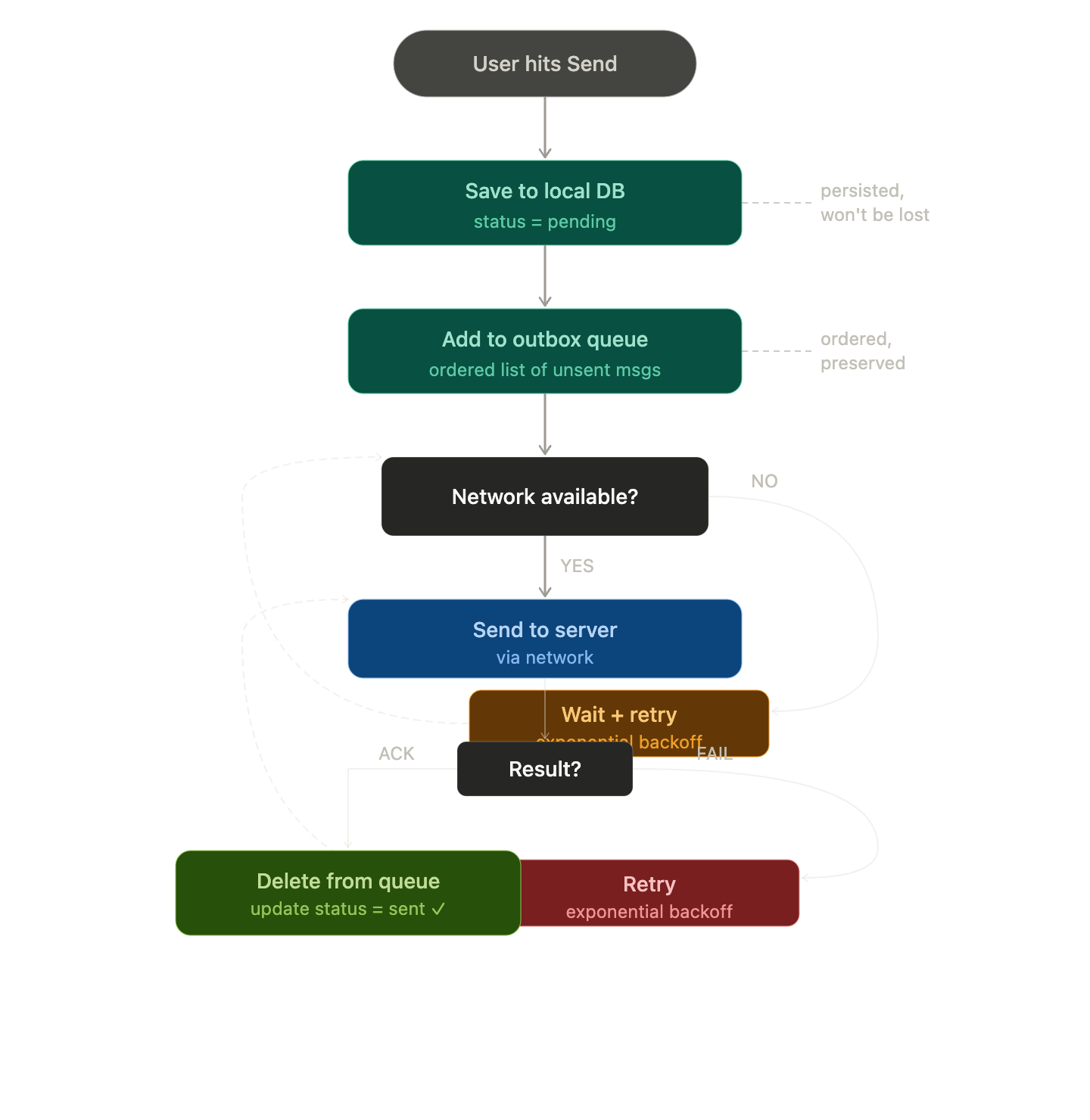
User Hits Send The app accepts the action immediately — no error, no freeze. The message appears in the chat UI right away, usually with a "pending" indicator (clock icon, grey tick, etc.).
Message is Persisted Locally The message is saved to a local database (like SQLite) on the device with a status like pending or queued. This ensures it survives even if the app is killed or the phone restarts.
Outbox / Send Queue The message is added to an outbox queue — an ordered list of messages waiting to be delivered. Order matters so messages arrive in the sequence they were written.
Network Request Attempted (and Fails) The app tries to send the message to the server. The request fails — either immediately (no connectivity detected) or after a timeout. The failure is caught silently; the user isn't bombarded with errors.
App Monitors Connectivity The app registers a network listener (e.g. Android's ConnectivityManager, iOS's NWPathMonitor). It watches for the moment internet comes back — without polling constantly, which drains battery.
Retry with Backoff While offline, some apps retry periodically using exponential backoff (try after 2s → 4s → 8s → 16s...) to avoid hammering the network the moment a weak signal appears.
Connection Restored → Flush the Queue The moment connectivity returns, the app flushes the outbox — sends all pending messages in order to the server.
Server Acknowledges The server receives the message, stores it, and sends back an ACK (acknowledgement). The app updates the local message status from pending → sent.
UI Updates The pending indicator updates — a single tick, a checkmark, or whatever the app uses to signal successful delivery.
Local Storage and Message Persistance in Messaging Apps
What Needs to Be Stored Locally
Every message needs several pieces of data persisted, not just the text:
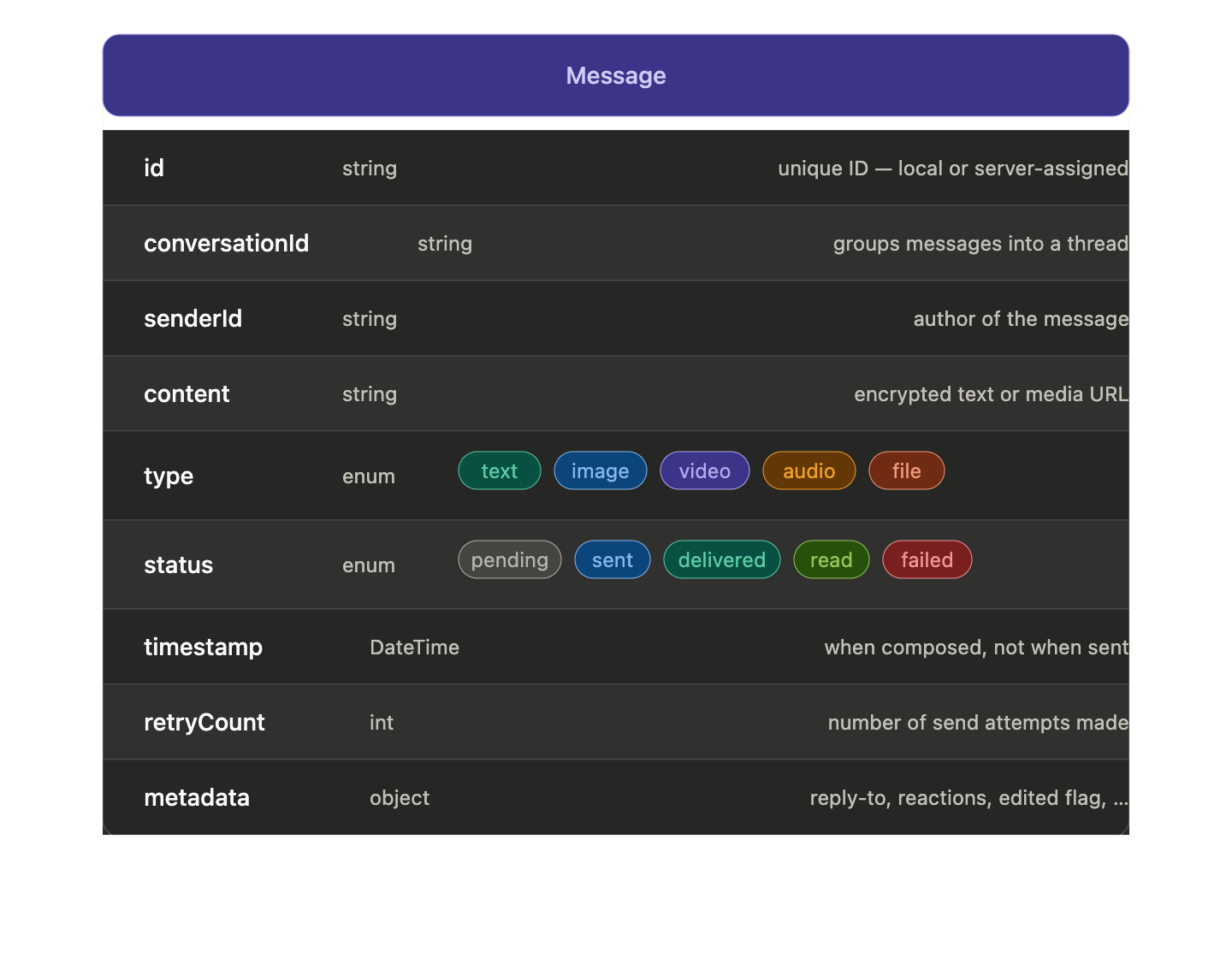
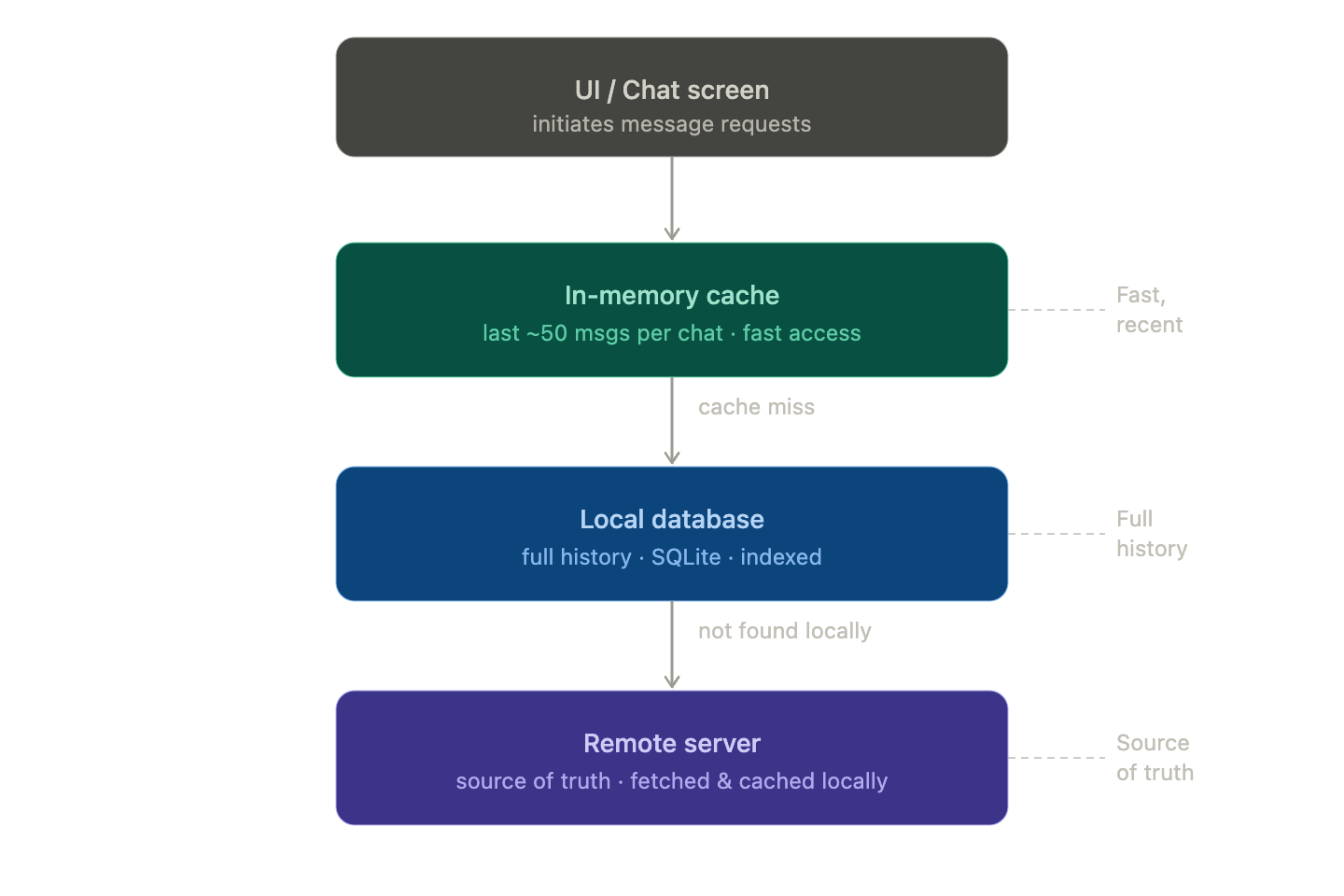
The Storage Stack
Messaging apps typically use multiple layers, each serving a different purpose:
Write Order: Persist First, Send Later
This is the most important rule. The sequence must always be:
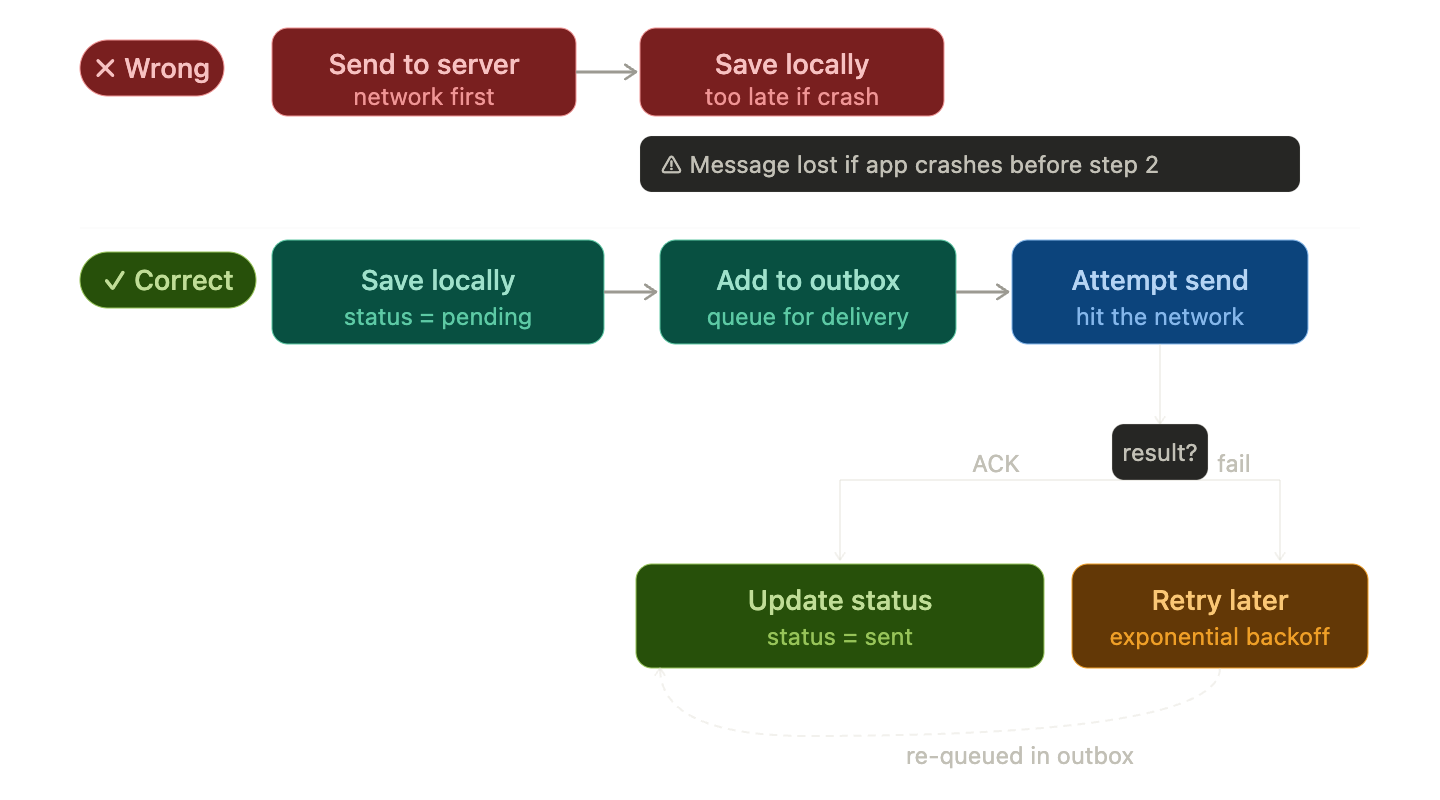
If the app crashes between saving and sending — no problem. The outbox still has the message. On next launch, it flushes automatically.
Message Status Lifecycle
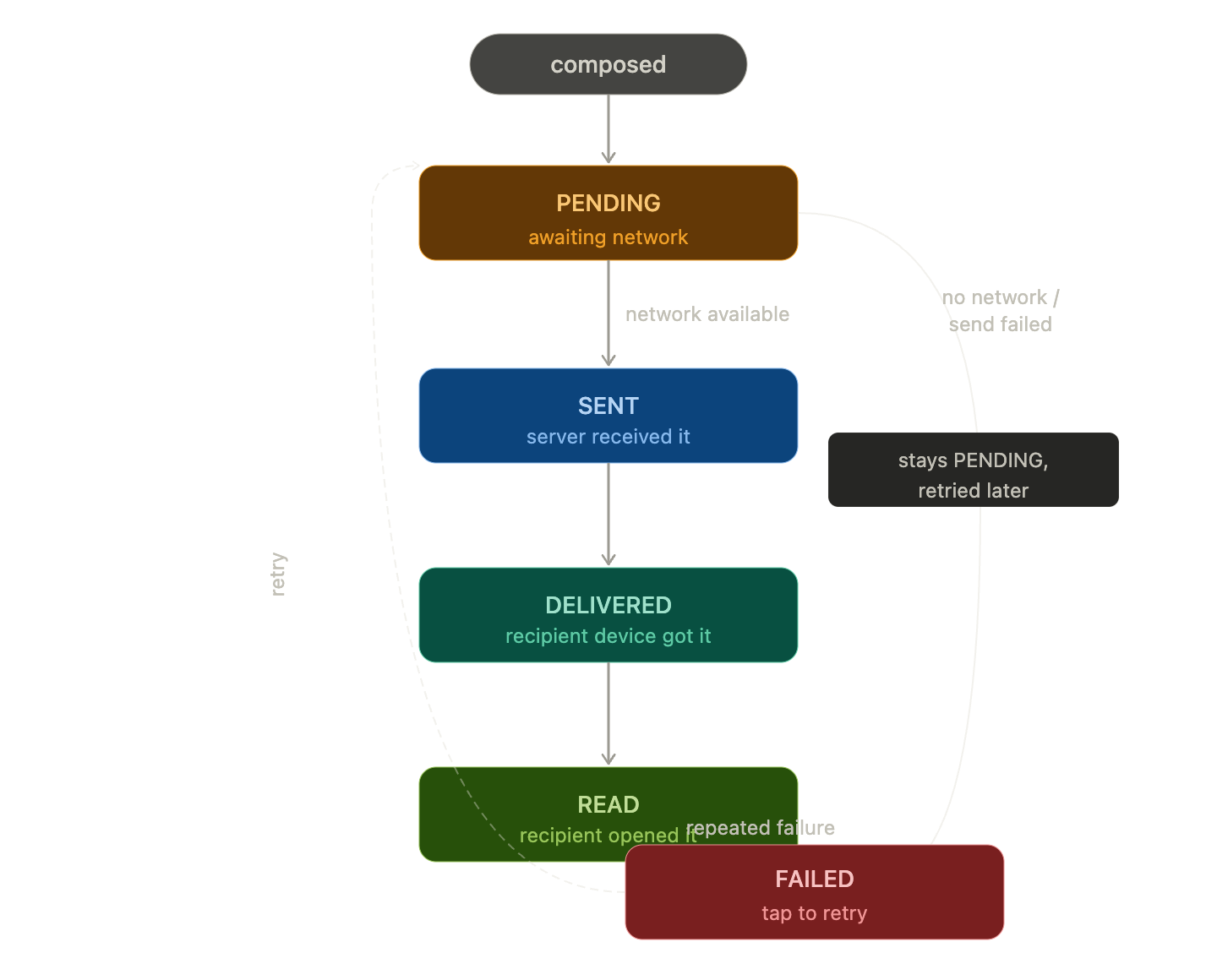
Each status transition updates a single column in SQLite — a cheap, atomic write.
Message queueing on the device
When you send a message with no internet, the app saves it locally and queues it — then delivers it automatically when connection returns.
Syncing messages when connectivity returns
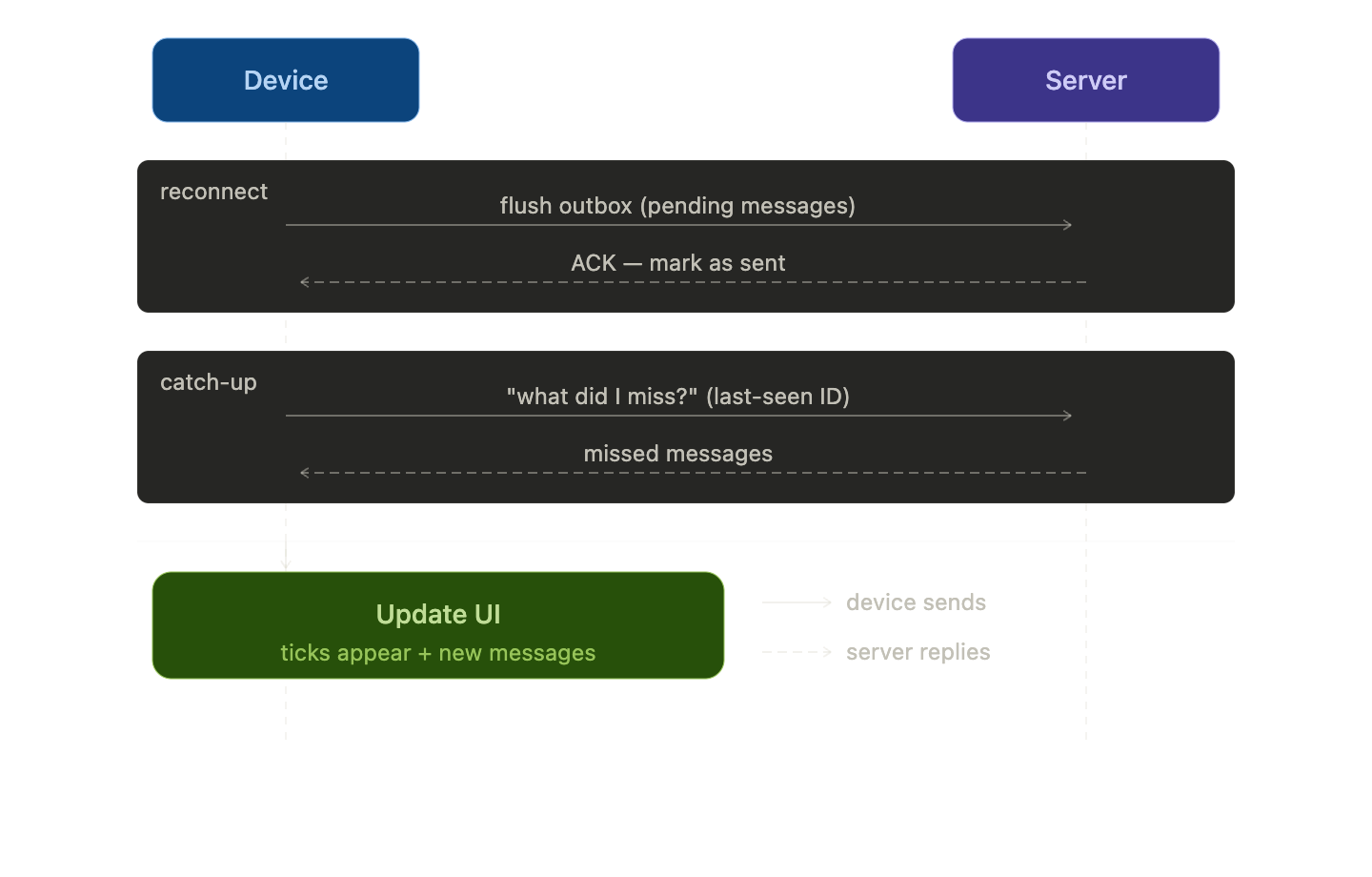
When internet connectivity returns, the app's network listener fires and the queue worker wakes up, grabs all pending messages from the outbox in order, and flushes them to the server one by one (or in batches). The server acknowledges each message, the app updates the local status from pending to sent, and the UI reflects the change instantly. At the same time, the app also pulls down any messages it missed while offline — new messages from others that arrived on the server during the gap — and stores them locally so the conversation is fully up to date. The whole sync happens silently in the background; the user just sees pending indicators turn to ticks and new messages appear, as if the gap never happened.
Delivery States Explained
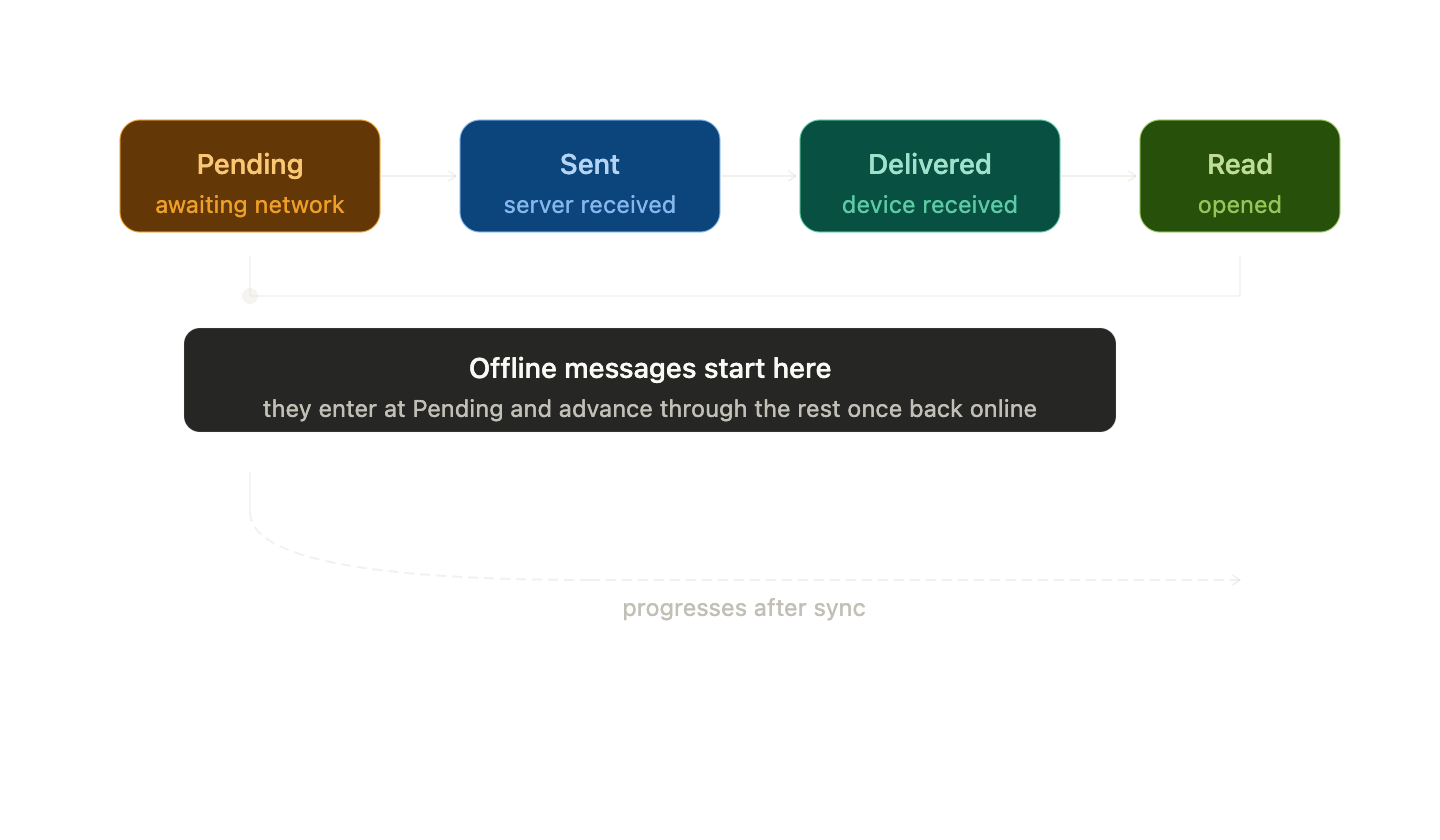
Those little icons beside messages represent different states.
Sent:
Message exists locally and has been accepted by the server.
Example:
✓
Meaning:
Your phone successfully uploaded the message.
Recipient may not have received it yet.
Delivered:
Message reached recipient’s device.
Example:
✓✓
Meaning:
The server delivered it to the recipient.
Read:
Recipient opened the chat and viewed it.
Example:
blue ✓✓
Meaning:
Recipient has seen the message.
Handling media uploads while offline
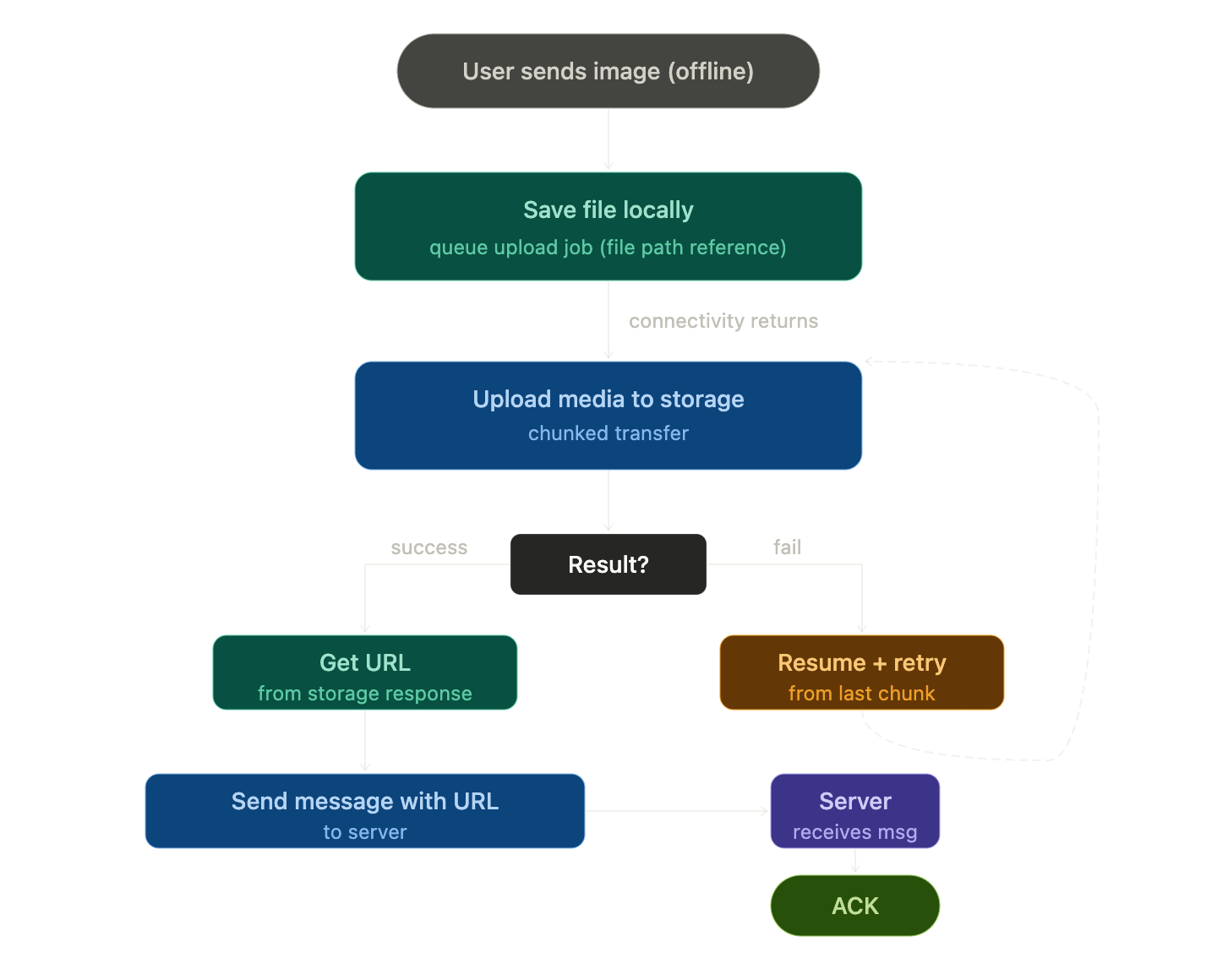
When a user sends an image or video while offline, the app saves the original media file locally and queues a upload job — not the file itself, but a reference to it. When connectivity returns, the app uploads the media to a storage server (like S3) first, gets back a URL, then sends the message with that URL attached. If the upload fails mid-way, it resumes from where it stopped using resumable uploads (chunked), so a 50MB video doesn't restart from zero on every retry.
Conflict Resolution and Message Ordering
Sync gets messy when multiple devices are involved.
Example:
You use:
phone
laptop
tablet
You send from phone offline.
Meanwhile someone replies from another device online.
Now ordering matters.
Which message appears first?
Apps solve this using:
timestamps
server receive time
message IDs
sequence numbers
These help rebuild correct chat order.
Example
Phone offline:
10:01 "Leaving now"
Friend online:
10:02 "Okay"
Phone reconnects at 10:05.
The app must insert:
10:01 Leaving now
10:02 Okay
—not by arrival time, but by message time.
Reliability and User Experience Considerations
Core Reliability Challenges
Message Delivery Guarantees Messaging systems must choose a delivery semantic: at-most-once (messages may be lost), at-least-once (duplicates possible), or exactly-once (hardest to achieve). Most production systems settle for at-least-once with deduplication on the client side.
Network Partitions & Offline Behavior Apps must gracefully handle intermittent connectivity. This means local message queuing, optimistic UI updates (showing a message as "sent" before server confirmation), and a reconciliation step when connectivity resumes.
Ordering & Consistency In distributed systems, global message ordering is expensive. Most apps use per-conversation ordering via logical clocks or sequence numbers rather than true global timestamps, which are vulnerable to clock skew across devices.
Key UX Considerations
Message Status Indicators The classic progression — sending → sent → delivered → read — gives users confidence. Each state requires a different backend signal: an ack from your server, an ack from the recipient's server, and a read receipt from the recipient's client respectively.
Optimistic UI Show the message immediately in the UI, then reconcile with server state. If delivery fails, surface an error inline with a retry option — don't silently drop the message or make users hunt for failures.
Latency Perception Humans perceive latency above ~100ms as a "lag." Techniques to mask it include:
Pre-fetching message history when a conversation is opened
Typing indicators (keeps the user engaged while waiting)
Skeleton loaders instead of blank screens
Notifications Push notifications are a reliability surface of their own. Silent pushes can be throttled by the OS (especially iOS background limits). A common fallback is polling on app foreground as a safety net.
Platform-Specific Considerations
Mobile Battery and network efficiency matter. Use push over polling, batch API calls, and compress payloads (protobuf over JSON for high-volume apps).
Web Service Workers can intercept and cache messages for offline viewing. IndexedDB is the standard for local message storage in browsers.
Multi-device Syncing read state and message history across devices adds significant complexity — you essentially need a distributed log per user, not just per conversation.
How Offline first architecture improves usability in messaging apps
Offline-first means the app is designed to work primarily from a local data store, syncing with the server when connectivity is available — rather than treating the network as a prerequisite. How It Improves Usability
Messages Send Instantly (Perceived) With optimistic UI, messages appear in the conversation the moment the user hits send — queued locally and synced in the background. Users don't wait for a server round-trip to see their own message. This makes the app feel snappy regardless of network conditions.
Full Readability Without a Connection All previously received messages, media, and conversation history are available from local storage. Commuters in tunnels, users on flights, or anyone in a low-signal area can read and scroll through conversations without interruption.
Drafts and Queued Messages Survive Messages composed offline are persisted locally and delivered automatically when the connection returns — without user intervention. Nothing is lost if the app is closed or the device restarts.
Eliminates Disruptive Loading States Traditional online-first apps show spinners or blank screens when the network is slow. Offline-first apps render from cache immediately, making transitions seamless and reducing frustration.
Resilience to Poor Connectivity In regions with unstable networks (common in mobile use), the app gracefully handles dropped connections, packet loss, and intermittent signal — without crashing or losing state.
Conflict Resolution — The Hard Part
When a user sends messages offline and another device also modified state, the system must reconcile differences. Strategies include:
Last-write-wins — simple but can cause data loss
Vector clocks / CRDTs (Conflict-free Replicated Data Types) — used by apps like Notion and some messaging platforms to merge concurrent changes without conflict
Server as source of truth — local state is tentative; server confirms or corrects on sync
Real-World Examples
WhatsApp queues messages with a clock icon, delivering them when connectivity returns — users know the state without anxiety.
iMessage stores conversations locally and syncs across devices, with clear delivery/read receipt states that update asynchronously.
Signal uses local encrypted storage as the primary data layer, with the server acting purely as a relay — messages aren't even stored server-side after delivery.
Conclusion
When you send a WhatsApp message in airplane mode, the app doesn’t actually send it immediately.
Instead it:
stores the message locally
marks it pending
shows it instantly in the chat
queues it for upload
waits for connectivity
syncs when internet returns
updates delivery state afterward
To users, it feels effortless.
Behind the scenes, it’s a carefully coordinated system of:
local persistence
background queues
synchronization
retries
eventual consistency
That’s what makes modern messaging apps feel reliable even when the internet isn’t.
And it’s one of the best examples of offline-first system design done right.


